
Midjourney प्रॉम्प्ट गाइड: यार्न पेट स्टाइल ट्यूटोरियल
Midjourney AI Team · 23 जुलाई 2026 · 8 min read
यह गाइड किसके लिए है
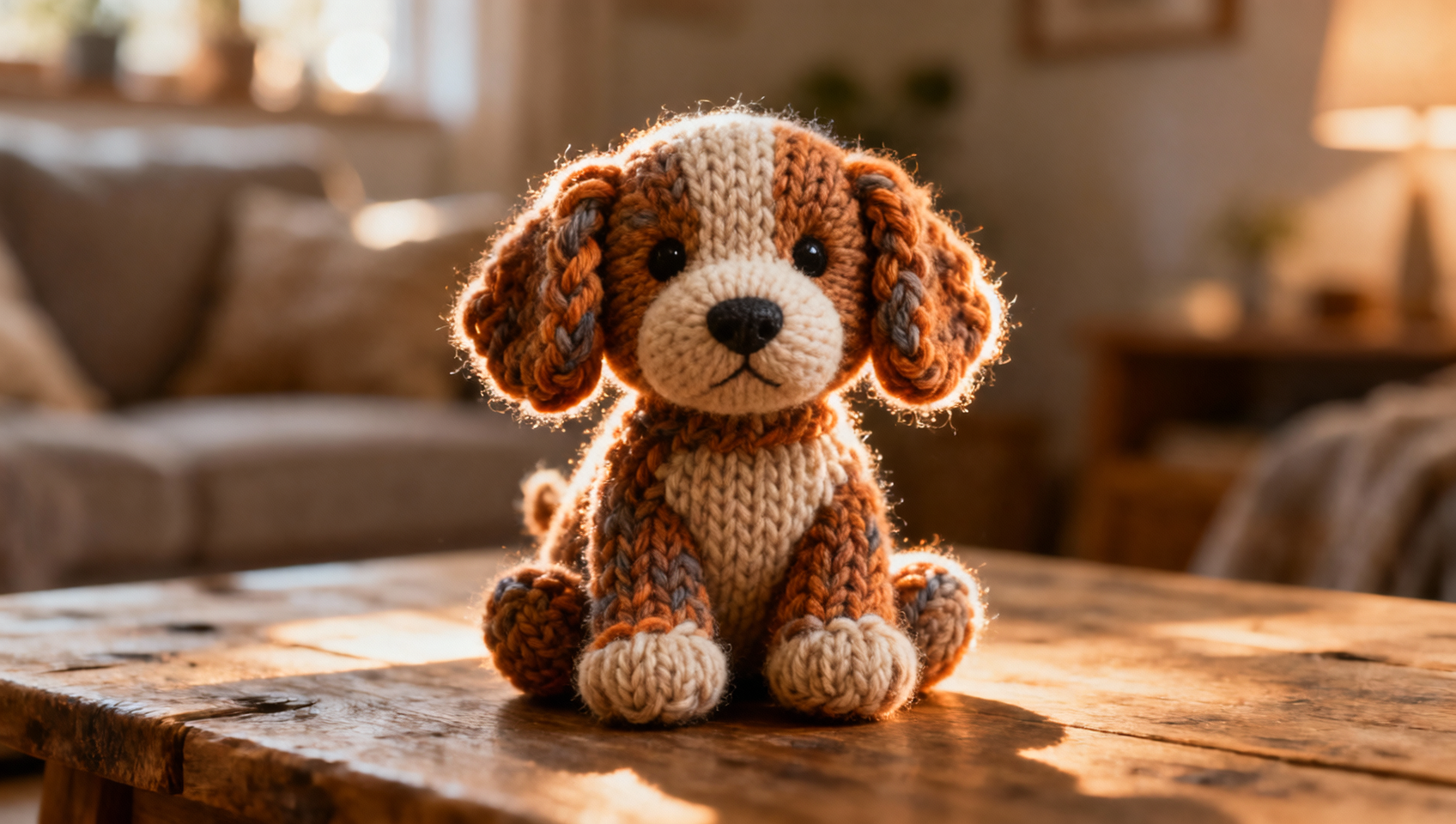
जनरेटिव AI में विश्वसनीय टेक्सटाइल एस्थेटिक्स बनाने के लिए केवल "knitted" टाइप करना काफी नहीं है। आपको यह समझना होगा कि रोशनी फाइबर के साथ कैसे interact करती है, तनाव आकार को कैसे प्रभावित करता है, और टेक्स्ट के माध्यम से स्पर्श की गर्माहट कैसे communicated की जाए। यह गाइड डिजिटल कलाकारों, कंटेंट क्रिएटर्स और डिजाइनर्स के लिए बनाई गई है जो Midjourney का उपयोग करके high-fidelity यार्न-स्टाइल पेट कैरेक्टर बनाना चाहते हैं। चाहे आप बच्चों की किताब के लिए assets बना रहे हों, स्टिकर डिजाइन कर रहे हों, या एनिमेशन के लिए कैरेक्टर का प्रोटोटाइप तैयार कर रहे हों, इस specific niche में महारत हासिल करना आपके पोर्टफोलियो को अलग बना देगा।
हम बिल्कुल उस syntax को breakdown करेंगे जो बिना पिघले हुए ऊन या प्लास्टिक जैसी फाइबर की अवास्तविकता में फंसे हुए, soft, plush और handcrafted looks प्राप्त करने के लिए आवश्यक है। आप सीखेंगे कि images की एक series में consistency बनाए रखने के लिए Midjourney के latest versioning और style parameters का कैसे leverage लिया जाए। यहां mention किए गए सभी workflows को सीधे MidassAI Studio में test किया जा सकता है, जहां आप अपनी generations को manage कर सकते हैं और तेजी से iterate कर सकते हैं।
कोर प्रॉम्प्ट टेम्पलेट
एक reliable yarn pet generate करने के लिए, आपको एक structured prompt की आवश्यकता है जो subject matter से पहले material definition को priority दे। एक common mistake जानवर की type पर बहुत अधिक ध्यान केंद्रित करना है जबकि medium को neglect किया जाता है। निम्नलिखित template एक robust starting point के रूप में कार्य करता है। यह subject, material, lighting और technical parameters को अलग करता है。
यहाँ एक मजबूत starting point के रूप में यह template दिया गया है:
/imagine prompt: a cute [animal type] made entirely of colorful yarn, knitted texture, visible wool fibers, soft lighting, macro photography, handmade aesthetic --style raw --v 7 --ar 4:5
[animal type] को अपने subject से replace करें, जैसे "corgi," "kitten," या "dragon।" वाक्यांश "made entirely of colorful yarn" crucial है। यह model को skin और fur को textile structures से replace करने का निर्देश देता है। "visible wool fibers" जोड़ने से यह सुनिश्चित होता है कि renderer texture को plastic look में smooth न करे। --style raw parameter यहाँ essential है। यह Midjourney के default beautification filters को कम करता है, जिससे yarn की rougher, authentic texture visible रहती है बजाय इसके कि इसे perfection में airbrushed किया जाए।
इस template का उपयोग करते समय, color palette को explicitly consider करें। Yarn art heavily color blocking पर निर्भर करता है। आप "pastel blue and white yarn" या "variegated wool threads" specify कर सकते हैं। यहाँ specificity AI को muddy, indistinct colors generate करने से रोकती है जो handcrafted illusion को ruin कर सकते हैं।
कीवर्ड गहन विश्लेषण: टेक्सचर और लाइट
एक अच्छी generation और एक महान generation के बीच का अंतर अक्सर secondary keywords में होता है। आपको यह describe करना होगा कि object क्या है ही नहीं, बल्कि यह कैसा feel होता है। Yarn pets के लिए, tactile adjectives आपके सबसे powerful tools हैं।
टेक्सचर कीवर्ड:
- Knitted: Interlocking loops को imply करता है, structured shapes के लिए अच्छा है।
- Crocheted: Tighter, knot-based texture का सुझाव देता है, अक्सर detailed limbs के लिए बेहतर होता है।
- Felted: Smoother, matted wool look बनाता है, less defined loops।
- Unraveling: Movement या imperfection का sense जोड़ता है, dynamic shots के लिए great है।
- Chunky Wool: मोटे yarn को imply करता है, larger, cuddlier दिखने वाले pets के लिए suitable है।
लाइटिंग और कैमरा: लाइटिंग को cozy atmosphere को enhance करने के लिए soft होना चाहिए। Harsh shadows yarn को wire जैसा बना देते हैं। "diffused lighting," "softbox," या "window light" जैसे keywords का उपयोग करें। कैमरा settings के लिए, "macro photography" key है। यह AI को fibers के fine details पर focus करने के लिए force करता है। shallow depth of field (bokeh) background से pet को isolate करने में मदद करता है, texture को emphasize करता है।
कंपोजिशन: यदि आप paw details के साथ struggle कर रहे हैं तो शुरुआत में full-body shots से बचें। face पर close-ups AI को eyes और snout texture पर अधिक pixel density devote करने की अनुमति देते हैं। एक बार आपके पास एक consistent face हो जाए, तो आप zoom out कर सकते हैं। हमेशा eyes की जांच करें; yarn styles में, eyes अक्सर beads या buttons होते हैं। realistic animal eyes generate करने से बचने के लिए जो textile body के साथ clash करते हैं, "button eyes" या "bead eyes" specify करें।
Quick Takeaways
एडवांस्ड पैरामीटर और वर्जनिंग
Midjourney तेजी से evolve होता है, और parameters हर version के साथ shift होते हैं। वर्तमान में, --v 7 earlier versions की तुलना में complex textures में superior coherence offer करता है। Yarn के साथ काम करते समय, consistency अक्सर एक challenge होती है। आप एक perfect cat generate कर सकते हैं, लेकिन अगली image अलग breed की और अलग wool की बनी हुई लग सकती है।
इसे solve करने के लिए, Style References (--sref) का उपयोग करें। एक बार जब आप perfect wool texture और color palette के साथ एक image generate कर लेते हैं, तो उसका URL copy करें। अपने subsequent prompts में --sref [URL] append करें। यह aesthetic style को lock करता है जबकि आपको pose या animal type को change करने की अनुमति देता है। Character References (--cref) texture के लिए कम effective हैं लेकिन different scenes में एक specific custom character के shape को maintain करने में मदद कर सकते हैं।
Aspect ratio (--ar) भी outcome को influence करता है। portraits और mobile wallpapers के लिए vertical ratios जैसे --ar 4:5 या --ar 9:16 best work करते हैं। horizontal ratios जैसे --ar 16:9 scene-based images के लिए बेहतर हैं जहां pet एक knitted environment के साथ interact कर रहा है, जैसे कि yarn ball landscape। square ratios से बचें जब तक कि आप specifically Instagram grids के लिए design न कर रहे हों, क्योंकि वे कभी-कभी fibers की detail को compress कर देते हैं।
स्थिर छवियों से आगे बढ़ना
Yarn pet assets की utility static wallpapers से कहीं अधिक है। एक बार जब आपके पास consistent characters की एक library हो जाती है, तो आप उन्हें broader multimedia projects में integrate कर सकते हैं।
AI वीडियो: Static yarn pets को video generation tools का उपयोग करके animated किया जा सकता है। अपने Midjourney output को video AI models में feed करके, आप blinking button eyes या wagging tail जैसे subtle movements create कर सकते हैं। Prompt structure similar रहता है, लेकिन आपको यह ensure करना होगा कि motion के تحت texture hold हो। video output में flickering textures को prevent करने के लिए base image में consistent lighting critical है।
AI संगीत: Ambience matter करता है। यदि आप इन pets के вокруг एक brand या story create कर रहे हैं, तो audio को visual warmth से match करना चाहिए। Generative music tools cozy, lo-fi beats या soft acoustic tracks create कर सकते हैं जो handmade visual style को complement करते हैं। Audio को wool के auditory equivalent के रूप में सोचें—soft, warm, और comforting।
AI टूल्स और इंटीग्रेशन: इन assets को manage करने के लिए organization की आवश्यकता होती है। MidassAI Studio एक centralized environment provide करता है जहां आप अपने prompt variations, reference images और final outputs को store कर सकते हैं। multiple discord channels या external folders को juggle करने के बजाय, आप workflow को generation से publication तक streamline कर सकते हैं। यह विशेष रूप से useful है जब आप एक series पर iterate कर रहे होते हैं जहां आपको track करने की आवश्यकता होती है कि किस --sref URL ने best wool consistency produce की।
वाणिज्यिक अनुप्रयोग: ये assets highly marketable हैं। ये sticker packs, greeting cards और social media avatars के लिए well work करते हैं। Handmade aesthetic digital space में authenticity की तलाश करने वाले audiences के साथ strongly resonate करता है। अपने prompt engineering को refine करके, आप ऐसे assets produce कर सकते हैं जो physically crafted लगते हैं, digital products में perceived value जोड़ते हैं।
अपने वर्कफ़्लो को अंतिम रूप देना
Perfect yarn pet प्राप्त करना एक iterative process है। आपकी first generation शायद ही कभी perfect होगी। आपको wool की "chunkiness" को adjust करने या ears के shape को correct करने की आवश्यकता हो सकती है। Variations feature का उपयोग sparingly करें; अक्सर variations पर dice roll करने की तुलना में अधिक specific texture descriptors के साथ prompt को rewriting better results yield करता है।
fine fiber details को capture करने के लिए अपनी favorite images को upscale करना न भूलें। एक low-resolution yarn pet blur जैसा दिखता है; एक high-resolution one real object की photograph जैसा दिखता है। जब आप अपने production को scale करने या एक team के साथ collaborate करने के लिए ready हों, तो अपने workflow को एक dedicated studio environment में ले जाना ensure करता है कि आप version control और asset quality को maintain रखें।
इन advanced Midjourney workflows को support करने वाले streamlined experience के लिए, online available dedicated tools को explore करें। आप integrated studio environment का उपयोग करके इन prompts के साथ experiment कर सकते हैं और अपनी gallery को efficiently manage कर सकते हैं।
MidassAI Studio में Midjourney आज़माएं और आज ही अपना yarn pet collection बनाना शुरू करें।